
The upcoming 2026.15 software update brings Rivian Assistant, the new AI voice assistant, and that’s the headline by a wide margin. It’s still in internal testing right now but should start rolling out to the broader fleet within the next week or so.
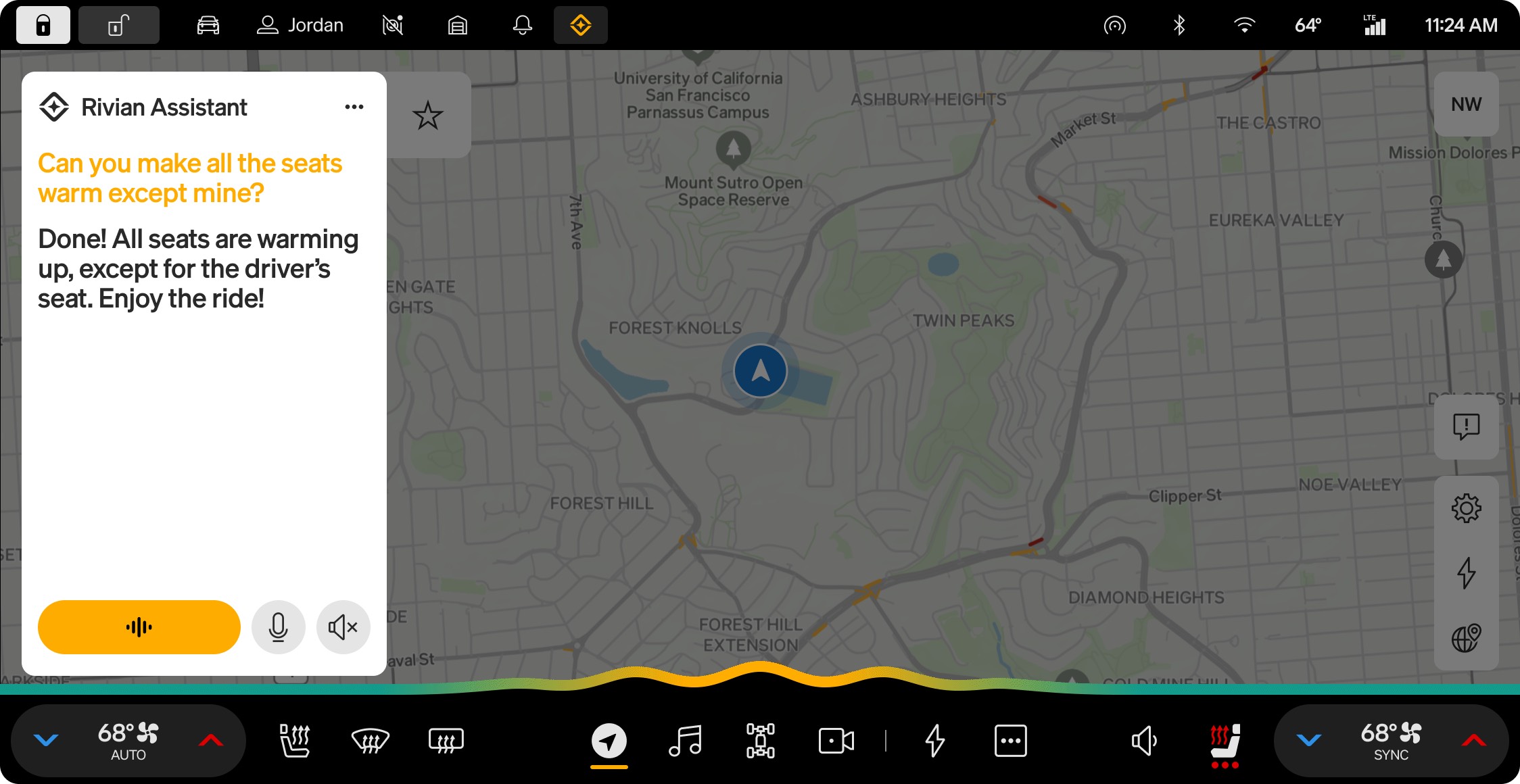
The assistant handles the usual stuff you’d expect, controlling vehicle settings, climate, media, navigation, and messages or calls. It can also pull from the Owner’s Guide when you ask about a feature, answer general questions like what the weather looks like at your destination or what song just played, and walk you through alerts or notifications when something pops up on the screen and you’re not sure what it means.
You can wake it up by long-pressing the left thumbwheel, tapping it in the status bar, or saying “Okay, Rivian” or “Hey, Rivian.” Heads up though, turning Rivian Assistant on automatically disables Alexa and its integrations.
Where it gets more interesting is the personalization side. In version 3.12 of the mobile app, a new Rivian Intelligence section lets you opt into Google Calendar integration and a Memory feature that learns your preferences over time. Both are off by default. Rivian has also told me that other calendar integrations beyond Google are coming in future updates, so if you’re an Apple or Outlook user, hang tight. Rivian Assistant itself is also limited to vehicles with an active Connect+ subscription or trial, and for now it’s English only.
The other notable addition is Profile authentication, which lets you set a four to six digit PIN tied to your driver profile so your personalized settings are locked behind your digital key or that PIN.
Beyond that, Gen 2 trucks get a handful of refinements to Autonomy+, improved camera defrost, more reliable remote commands, and a fix for a rare range estimation hiccup at very low or very high state of charge. There are also some smaller infotainment fixes for HD Radio, screen rendering, and a few theme color mismatches inside Settings.
The full release notes with every fix and improvement are over on the 2026.15 release notes page if you want to dig in. A full video review will be coming soon once the update is out in the wild so we can put Rivian Assistant through its paces in the real world.
Rivian Assistant is the part most people are going to care about though, and once it’s actually in owners’ hands we’ll get a much better sense of how it stacks up against what the rest of the industry has been shipping lately.



“Heads up though, turning Rivian Assistant on automatically disables Alexa and its integrations.” Was this sentence intended to sound like this is a negative?
Haha
Not having the prompt be “hey Gary” or letting you name your assistant your car name is a miss. Hopefully an added feature in the future!
I am sure everyone with the name Gary is relieved the prompt is not “Hey, Gary”. I don’t know anyone with the name Rivian. 🙂
I’m looking into buying a Rivian and wanted to know. The subscription (which I hate that this is where companies are now). Is it per car? Or can I have it setup on multiple Rivians. Say if my wife and I get one each.
Unfortunately, it is per car. No family discounts.
That is just incredibly disappointing. Subscriptions are already out of control. Really makes me rethink buying a Rivian.
Just so you know, this roughly $12 a month subscription is an unlimited data connection. You can use it as Wi-Fi, it handles all your music streaming, live traffic etc.
It’s basically a legitimately unlimited cell service that’s $12 a month. I wouldn’t allow it to shift you from not buying the car.
I don’t like subscriptions either. However,
the subscription is for connect+, which basically means your car is a wifi hotspot. Of course this kind of thing is per device (in this case it’s the vehicle). It allows music streaming and easier software updates. It’s awesome. My kids love it for road trips they can connect their Nintendo Switch to it.
I’m sure there are benefits, but the idea that I have to pay any amount to (for example) sign into my Apple Music seems a bit ludicrous.
Will Rivian Assistant always be a Connect+ feature or is that just for the launch?
For the time being, it’ll be associated with Connect+
Supper disappointing! I was very excited for this to be released after last years demos. Have been mentioning it to family and friends even (I am sure they are tired of me talking about my Rivian 🙂 ). Since I already pay for cellular data via my phone I am a daily driver that connects Rivian to my phones hot spot for Apple Music native vehicle interaction.
Now just another fun feature that will live unused behind a pay wall. Zero is the number of times I have rented a vehicle with Apple Car play and had to chip in extra to use it. Sigh.
Maybe I am in the minority here, does everyone out there subscribe to Connect +? Or is the Connect+ at initial role out just a good way to limit users at the beginning as scaled usage is first tested out?
Cheers!
My gut feel is that every “new” feature will be part of Connect+. It is a shame that no “new” features are coming to Gen1. I guess I can drop my Connect+ subscription. 🙂
That being said, I would be very hesitant to purchase an early R2, as Rivian has already said new hardware will roll out around December. Based on their track record, Launch Edition R2 will be obsolete before they even finish delivering them.
Does this also mean that we will get a new voice for navigation guidance as well?
Yeah, no. I don’t need or want Rivian (or anyone’s) “personal assistant”. I’m capable of doing things myself and, in my experience, it is faster for me to just tap the screen/buttons rather than go through the effort of asking some assistant to do things, especially as simple as climate control. What I would like is Rivian to continue enhancing the functionality of the actual vehicle and not keep introducing crap like this.
It is much safer to talk to the car vs look at the screen in traffic/poor weather. I’m greatly looking forward to this and finally having a text message interface.
Is the Rivian Assistant running / processing input on my R1 or is it sending the audio back to Rivian cloud to be processed? If it’s processing in-car, then I’m hopeful eventually some limited features will be available without the Connect+ (as one who does not have it).
Also, does the “Google Calendar integration” mean that when I go to maps widget in my R1, it’ll provide me with my next appointment’s address as one of the places to go?
Everything is useless to someone.
Why focus on the infontainment at all? You can simply offload this to CarPlay / Android Auto – get all this integration for low cost. Infontainment is not a differentiator at all, Rivian’s biggest hurdle is to stay ahead of the competition in drivetrain, battery and autonomy. Without solving these and getting a leadership position, it’s hard to beat Tesla and others who are rolling out the Nvidia kits. All this support around assistants, and maps, and music is at best a distraction from the mission.
Yes, others will say its the brand, and control and all that but given the limited resources, focus on what gives you the edge, and don’t lose focus on what matters in the long run.
I can’t wait. Not having CarPlay has been a bummer. If I can get some of that functionality (ie voice to text and reading aloud) baked into my Gen1 R1 I’ll be happy. The R1 iPhone integration thus far is basically the same user experience as in my 78 F150 with a BT stereo.
How about fixing the app/vehicle integration and phone as a key? My teslas had zero issue with it, just walk up and open door. With rivian I walk up, fiddle with app, get an error, walk to frunk and push button to wake the car. Wait a little more, open app, finally unlocks.